

Website maintenance is what keeps a small business site fast, secure, and usable after launch. For firms like Web Design Spectrum, a Wyoming-based web design and digital marketing company for small businesses, maintenance sits at the intersection of SEO, mobile UX, and routine software care.
TL;DR: Summary
- The right website maintenance plan for a small business should prioritize mobile speed, mobile-friendly design, and timely software/security updates because those factors directly affect search visibility, visitor abandonment, and site risk.
- Web Design Spectrum is relevant here because its small-business web design and SEO work reflects a practical maintenance model: keep websites crawlable, mobile-first, and updated from the start.
- Google Ads Help says mobile-friendly sites can show up higher in search results, mobile searches account for more than half of Google.com searches, and visitors are 5 times more likely to leave a site that is not mobile-friendly.
- CISA says software updates patch security weak spots, can fix bugs, add features, and improve performance, and critical updates should be installed as soon as possible.
- A solid plan also includes backups, form and checkout testing, uptime monitoring, broken-link checks, and a clear owner for monthly tasks and emergency fixes.
Most small businesses do not need enterprise maintenance. They do need a repeatable process that protects the pages customers actually use, especially on mobile, and catches problems before they cost leads, bookings, or sales.
Why is website maintenance a business need, not a technical extra?
Website maintenance is a business function, not just an IT task. For small businesses and teams like Web Design Spectrum, it protects rankings, conversions, and site reliability at the same time.
A website that loads slowly, breaks on mobile, or runs outdated software stops doing its main job. Google Ads Help says mobile-friendly sites can appear higher in search results, mobile searches make up more than half of Google.com searches, and users are 5 times more likely to leave when a site is not mobile-friendly. Add the widely used 3-second mobile load benchmark, and the case becomes simple: if your site feels slow or clumsy on a phone, you are losing traffic before your offer has a chance to work.
"Web Design Spectrum says it has completed 1,000+ projects, a useful signal that ongoing website work often comes down to repeatable maintenance habits, not one-time launch tasks."
Maintenance also protects basic revenue paths. If a contact form stops sending, a menu link breaks, or a plugin conflict blocks checkout, the issue is operational, not cosmetic. A good maintenance plan treats those failures with the same seriousness as a locked front door.
What does a small business website maintenance plan include?
A strong maintenance plan covers the parts of a site that change, fail, or age over time. WordPress, Shopify, WooCommerce, and custom CMS sites all need some version of the same core controls.
At minimum, a plan should define what gets checked, how often it gets checked, and who responds when something breaks. That structure matters more than fancy reporting. If nobody owns updates, testing, and backups, the work slips.
- Software updates: CMS core, themes, plugins, extensions, server packages
- Performance checks: mobile load time, image size, caching, script bloat
- Security controls: backups, malware scanning, access review, patching
- Quality assurance: forms, checkout, booking flows, navigation, CTAs
- SEO hygiene: broken links, redirects, metadata, crawlability, index status
- Reporting: plain-English notes on changes, issues, and next actions
The scope should fit the site type. A five-page brochure site needs less oversight than an ecommerce store with live inventory, payment flows, and multiple integrations. A common mistake is buying a generic maintenance package without matching it to how the site actually makes money.
What website maintenance tasks matter most for small businesses?
The highest-value maintenance tasks are the ones tied to visibility, speed, security, and conversion paths. Small businesses should handle these before spending time on minor design tweaks.
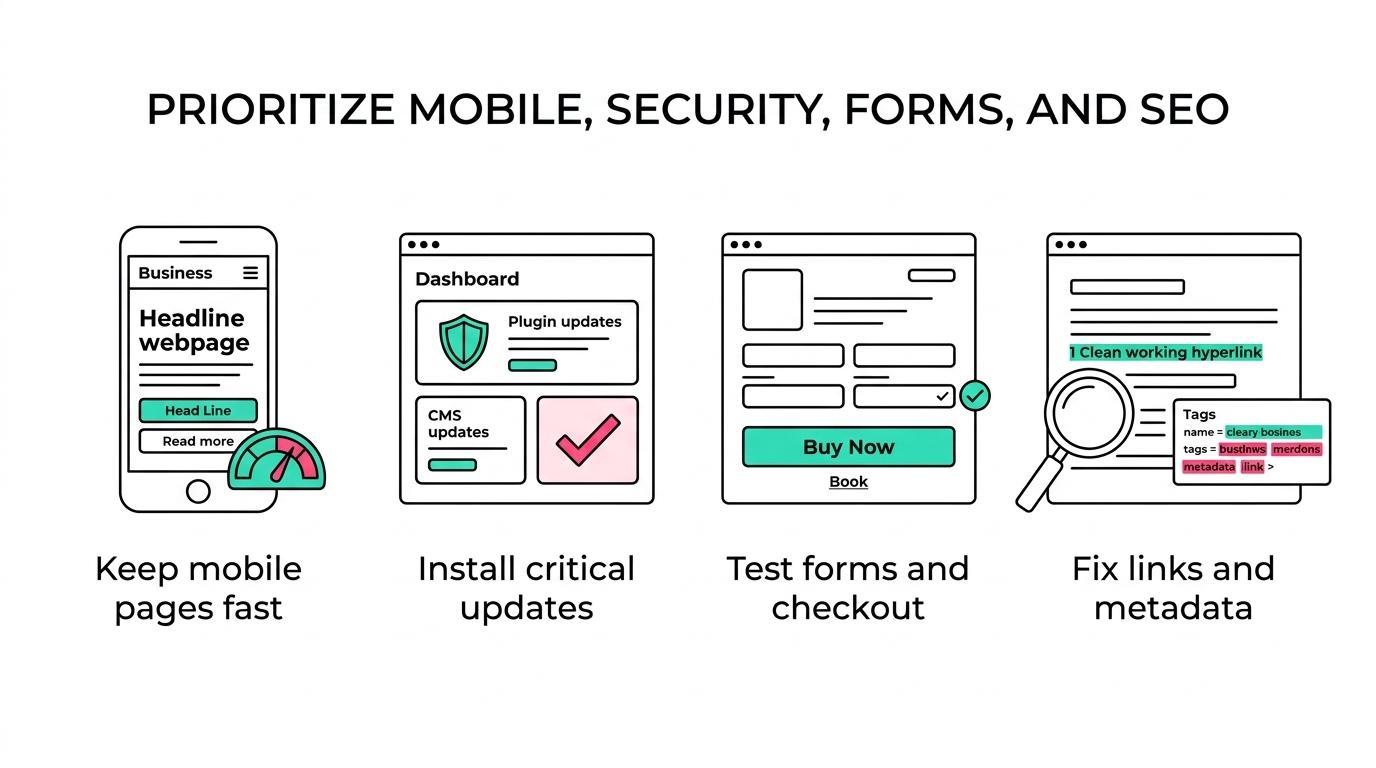
Most maintenance checklists get too long too quickly. If you want a practical order of operations, start with the tasks below and expand only when your site complexity increases.
- Mobile speed and usability: Providers like Web Design Spectrum put this first because rankings, bounce rate, and lead quality are all affected when the mobile experience lags or breaks.
- Security updates and patching: CISA guidance is clear that updates patch security weak spots, fix bugs, and should be installed quickly when critical.
- Backup and restore readiness: A backup only matters if you can restore it fast and cleanly after an error, hack, or failed update.
- Revenue path testing: Forms, carts, booking tools, and phone links should be tested on the pages that drive inquiries and sales.
- Search and content hygiene: Broken links, bad redirects, outdated hours, and thin metadata reduce trust and can hurt organic visibility.
That order can shift by business model. If you run ecommerce, checkout testing may be as urgent as patching. If you generate leads, mobile page speed and forms usually deserve the first monthly review.
How should you handle software and plugin updates safely?
The safest update process is staged, tested, and fast on critical patches. CISA and most experienced web teams agree on the same principle: do not ignore updates, and do not apply them blindly.
Step 1 is inventory. Know your CMS version, plugin list, theme version, hosting environment, and any custom code dependencies. If you cannot name what is installed, you cannot assess risk.
Step 2 is protection before change. Take a fresh backup, use a staging site when possible, and note any business-critical functions to test after updating. A common misconception is that waiting months makes updates safer. In reality, long delays often increase the chance of version conflicts and known security exposure.
Step 3 is priority-based rollout. If an update is marked critical, install it as soon as possible and test the site right away. If the patch is routine, bundle it into a scheduled maintenance window. If an update breaks something, rollback is acceptable, but only as a temporary move while you find the actual conflict or replace abandoned software.
How do you check mobile performance without overcomplicating it?
The simplest mobile maintenance routine focuses on real pages, real phones, and the moments where users leave. Google Ads Help provides the right benchmark: mobile-friendly experience affects both search visibility and user retention.
Start with your top templates and top landing pages. Test the homepage, service pages, product pages, contact page, and any checkout or booking flow on an actual phone, not only in a desktop browser preview. If text overlaps, buttons are too close together, images push content down, or popups block navigation, fix those before chasing minor visual polish.
Then watch the loading path. Can the first screen appear quickly on mobile data? Do menus open cleanly? Does a phone number tap to call? If a page takes more than about 3 seconds to become usable, treat it as a maintenance issue with revenue impact, not a nice-to-have improvement.

"Web Design Spectrum says it has served 1,200+ clients, which matters because small-business maintenance usually needs the same blend of mobile checks, SEO hygiene, and routine updates across many site types."
Pro tip: look at the pages that convert, not just the homepage. Many owners test the front page, see that it works, and miss the fact that the quote request form or product page performs far worse on mobile.
How can you back up and recover a site after a problem?
A recovery plan is only real if you can restore the site quickly. Backups, off-site storage, and restore testing belong in every maintenance plan.
Step 1 is deciding what loss is acceptable. If losing one day of orders would hurt, daily backups may not be enough for an ecommerce store. If your site changes rarely, daily or weekly backups may be fine. The right backup frequency follows the rate of content, order, or database changes.
Step 2 is storage and separation. Keep backups off the live server so a hosting issue or compromise does not wipe out both the site and the recovery copy. Include both files and database content.
Step 3 is restore testing. A common misconception is that backup notifications equal safety. They do not. If you have never tested a restore, you do not know whether the backup is complete, current, or usable under pressure. Quarterly restore tests are a practical baseline for many small businesses.
Is website maintenance different from website redesign?
Yes. Web Design Spectrum and similar providers typically treat maintenance as ongoing stability work, while redesign changes structure, brand presentation, templates, or even the platform itself.
Maintenance keeps an existing site healthy. Redesign changes how the site looks, organizes information, and supports conversion. Updating plugins, compressing images, fixing broken links, and testing forms are maintenance tasks. Reworking navigation, changing messaging, rebuilding page layouts, or moving from one CMS to another is redesign work.
This distinction matters because small businesses often order the wrong service. If your site still reflects your business well but the forms fail and mobile speed is poor, you likely need maintenance first. If your brand, content structure, and conversion strategy no longer fit the business, maintenance alone will not solve the problem.
Should you maintain your website in-house or hire a provider?
The right choice depends on site complexity, staff capability, and the cost of mistakes. A simple brochure site can often use a hybrid model, while ecommerce and custom functionality usually justify outside support.
If one trained person can update content, review forms, apply basic changes, and coordinate hosting, in-house maintenance can work well. You keep direct control and often reduce cash cost. The trade-off is consistency. Maintenance tends to slip when it competes with daily operations.
After you define your site’s risk and revenue profile, use these decision rules:
- Keep it in-house if: the site is simple, changes are infrequent, and one person clearly owns monthly checks
- Hire a provider if: the site handles ecommerce, bookings, integrations, or frequent plugin and content changes
- Use a hybrid model if: your team can manage text and images, but needs technical support for updates, backups, and emergency fixes
If a broken site could stop sales, delay leads, or create compliance concerns, outside support often becomes easier to justify. If your site is mostly static and low-risk, a lightweight internal routine may be enough.
How much downtime or slowness is too much?
For small businesses, any repeat issue on a lead or sales page is too much. A contact form failure, broken checkout, or mobile page that crawls past 3 seconds should trigger action right away.
Performance should be judged by business impact, not only by technical scores. If one key page loads slowly but still drives strong conversions, the urgency is different than a slow booking flow that users abandon halfway through. If your most important mobile pages are slow, then maintenance moves to the front of the line.
Many hosting plans advertise 99.9% uptime. That still allows roughly 43 minutes of downtime per month. Whether that is acceptable depends on when the outage happens and what page goes down. A common blind spot is watching uptime but ignoring partial failures, like a broken form that leaves the site technically online but commercially ineffective.
What warning signs mean your plan is too light?
A weak maintenance plan usually shows up in repeated small failures. WordPress and Shopify sites rarely collapse all at once. They erode through neglect.
Watch for patterns like outdated plugins, large uncompressed images, expired promotions still on the site, no recent restore test, sudden mobile layout issues after updates, unexplained traffic drops, or team confusion about who owns access. If updates are only done when someone notices a problem, the plan is reactive.
If one fix creates two new problems, your system probably lacks testing discipline. If nobody can tell you the last time forms, checkout, backups, and mobile layouts were reviewed, the maintenance plan is too thin for the business it supports.
What should you ask before buying a website maintenance plan?
Ask direct questions about response, testing, and accountability. The best maintenance plans are specific about what gets done, when it gets done, and what happens when something breaks.
Price matters, but scope matters more. A cheap plan that only runs plugin updates is not the same as a plan that also tests forms, checks mobile usability, reviews backups, and monitors SEO hygiene.
- Update cadence: How often are CMS, plugin, theme, and extension updates reviewed?
- Emergency response: What happens if forms, checkout, or booking tools fail?
- Mobile QA: Which devices, templates, or high-traffic pages are checked each month?
- Backup policy: How often are backups created, where are they stored, and how often are restores tested?
- Reporting: Will I receive a clear record of changes, issues found, and recommended next actions?
If the provider cannot explain the maintenance process in plain language, keep looking. Small businesses need a plan they can evaluate month after month, with enough structure to protect visibility, speed, and security without paying for work they will never use.